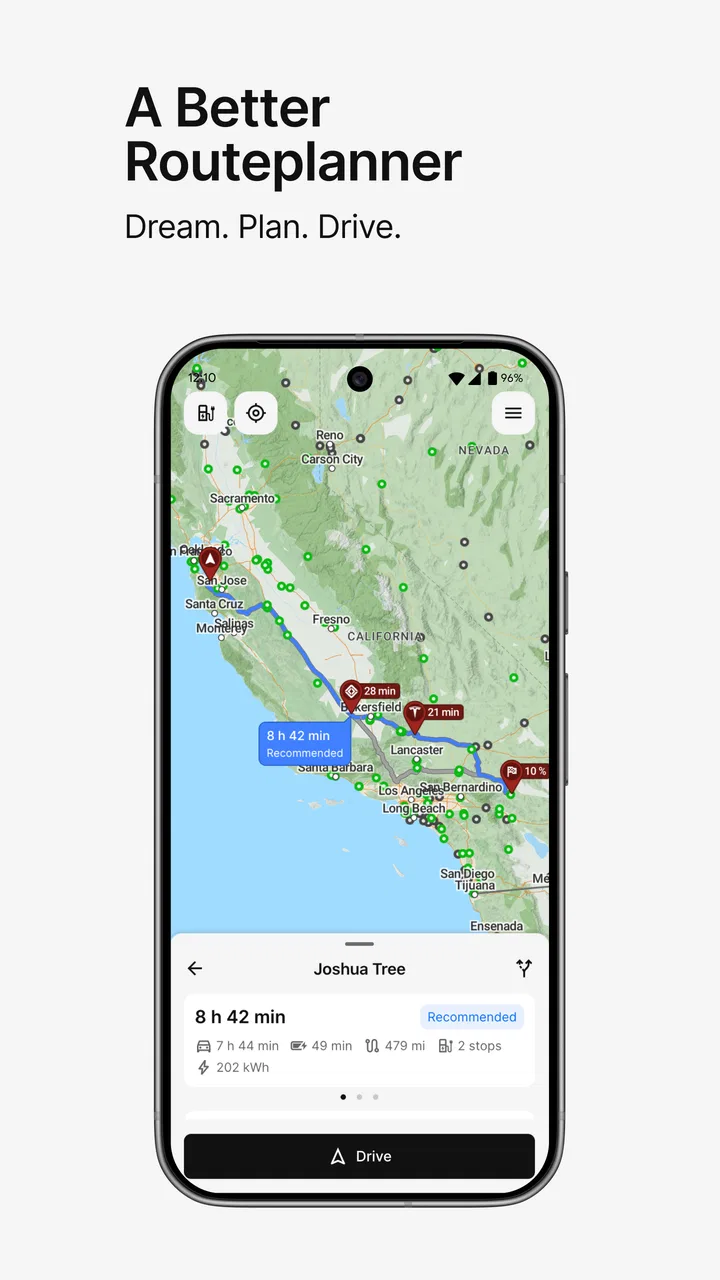
A Better Routeplanner (ABRP)
- 4.5
- Rating
- 1.00M
- Installs
- Free
- Price

 Analysis by App-foxy
I have used A Better Routeplanner, usually shortened to ABRP, as a dedicated trip-planning tool rather than as a general map app, and that distinction matters. It is built around the practical question electric-vehicle drivers ask before a long journey: where should I stop, how much charge should I expect, and how can I arrive without turning the trip into a guessing game? In my experience, it is one of the most useful apps in the Maps & Navigation category for drivers who want to plan charging deliberately instead of reacting to the battery warning.
The app comes from Iternio Planning AB and is free to install, with optional in-app purchases ranging from $4.99 to $49.99 per item. It is suitable for Everyone, and its Android listing shows more than 1M+ installs, a 4.5 average from around 22K ratings, and 560 reviews. Those figures fit my impression of the product: it is a focused tool with a substantial audience, but it is not trying to replace every navigation app on your phone.
How I use ABRP before and during a real trip
My normal workflow starts before I leave home. I enter the destination, choose the vehicle that matches what I actually drive, and look over the proposed charging stops rather than accepting the first plan automatically. That first review is important because an electric-car route is not only a line between two places. It is a sequence of energy decisions, and the usefulness of the result depends on whether the assumptions match my car, weather, driving style, and willingness to stop.
You May Also Like

 Blood Strike: 2.5 Anniversary
Blood Strike’s Loadouts Turn Every Drop Into a Tactical Gamble
A close look at Blood Strike’s custom loadouts: how fast access to signature weapons reshapes its battle royale rhythm, rewards preparation, and narrows the gap between fights.

 Pandora - Music & Podcasts
Pandora’s Music Is Easy to Start, but Harder to Recover
Pandora’s strength is its low-effort path from a seed to a station. Its weak spot is how much confidence it asks you to place in connection, setup, and quiet recovery.

 8 Ball Pool
 Is Built on Rivalries, Rematches, and Routine
A close look at the rivalries, rematches, shared routines, and unanswered safety questions that turn a quick pool match into a persistent mobile community.

 Samsung Music
’s Quiet Strength Is Playing What You Already Own
Its reach comes less from spectacle than from dependable access to a personal library. That simplicity is both the app’s strongest retention engine and its ceiling.

 AccuWeather: Weather Radar
AccuWeather Review: A Quick, Clear Forecast for Everyday Decisions
For everyday plans, the best forecast is the one you can understand quickly. AccuWeather makes rain timing, radar, and local conditions easy to act on, with a few trade-offs.

 Hill Climb Racing
Why Hill Climb Racing Still Turns Crashes Into One More Run
A tiny car, a bumpy hill and one more upgrade: Hill Climb Racing keeps resurfacing because its simple chaos makes every near-miss feel personal.
More From Our News Desk



The strongest part of the experience is the way the route is treated as a charging plan. A conventional navigation app may show charging locations as map points, but ABRP makes them part of the journey itself. I can think about the order of stops, the expected arrival charge, and whether a particular stop leaves enough flexibility if traffic or temperature changes the result. That makes it especially valuable for unfamiliar highways where I do not yet know which charging locations are convenient or dependable for my routine.
I would not use it as my only source of turn-by-turn guidance without checking how it fits with my preferred navigation app. ABRP is excellent at the energy side of the journey, while a mainstream map application may feel more polished for live traffic, lane guidance, local businesses, and last-minute road changes. My practical habit is to use ABRP to design the charging strategy, then use the navigation tool I already trust for the actual drive when that is more comfortable.
A realistic example is a weekend visit to another city. Before leaving, I plan the complete route and inspect the first proposed stop, not just the final destination. If the first stop is too close, inconvenient, or likely to create a long wait, I compare it with the next option. I also check whether the planned arrival charge gives me a useful buffer. On the road, I treat the plan as a living estimate rather than a promise: if consumption is higher than expected, I adjust early instead of waiting until the remaining range becomes stressful.
This approach answers a common question from new users: is the app only useful for very long trips? No. It can also help with medium-distance journeys when charging availability is uneven, when the weather is difficult, or when you are driving an unfamiliar electric vehicle. For a short trip through an area filled with convenient chargers, it may feel like extra preparation. For a route with large gaps between practical stops, the planning becomes much more valuable.
Why the vehicle profile matters more than the map
The route itself is only as good as the vehicle information behind it. I spend time making sure the selected car reflects the version I drive, because a plan based on the wrong battery or charging behavior can look reassuring while being unsuitable in practice. This is one of the less obvious lessons of using ABRP: the app is not a magic range calculator. It is a planning model, and the quality of that model depends on the choices made before the route is calculated.
I also avoid treating the suggested charging percentage as an instruction carved in stone. A stop that looks efficient on a quiet day may be less attractive if I need a bathroom break, food, or a longer rest. Conversely, charging a little more at one stop can make the next part of the trip less tense. ABRP helps me see the consequences, but I still make the final decision based on the people in the car and the conditions outside it.
That is where the app feels different from simply searching for charging stations on a map. A map search answers “what is nearby?” ABRP is closer to “which sequence of stops makes this entire drive workable?” Neither approach replaces the other. I prefer ABRP when the route needs thought, and a regular map when I am already familiar with the area and only need a quick nearby charger.
Settings I check before trusting a plan
The most important settings are the ones that change the energy estimate. I check the starting charge, the expected arrival charge, and the driving assumptions that influence consumption. I also consider whether I am carrying extra weight, using climate control heavily, or traveling in conditions that will make the car less efficient. These details may seem small, but they can turn a comfortable plan into an uncomfortable one if ignored.
I pay particular attention to the balance between speed and reserve. A plan that assumes very careful driving may be technically efficient but unrealistic for my trip. A plan with a generous reserve may feel safer but require an extra stop. I use the settings to find a compromise that reflects how I actually drive, rather than choosing the most optimistic route simply because it has fewer charging breaks.
Another useful habit is to review the charging network choices instead of assuming every available station belongs in the plan. A convenient location is not automatically a good stop. Access, opening arrangements, amenities, and the likely amount of time spent there can matter as much as the charger’s position on the map. I use ABRP to narrow the options, then I verify the practical details through the relevant charging service or local information before committing to a remote stop.
Experienced use also means checking the route after changing a setting. If I alter the starting charge or the desired reserve, I do not assume the app’s previous stop sequence still makes sense. I recalculate and compare the new plan with the old one. This repeatable habit prevents a subtle mistake: changing one assumption but continuing to rely on conclusions produced by another.
ABRP is also more useful when I separate planning from wishful thinking. I do not enter a destination and immediately screenshot the result. I look for the stop that acts as a backup, identify the section with the least flexibility, and consider what I would do if the preferred charger were busy or unavailable. The app can organize the route, but resilience comes from leaving myself alternatives.
Shortcuts that make repeat trips easier
For routes I drive regularly, I have found that the biggest time saving comes from creating a repeatable preparation routine rather than trying to master every control. I keep the same order: select the correct vehicle, set the starting charge, enter the destination, inspect the proposed stops, and then challenge the weakest part of the plan. Once that sequence becomes familiar, planning takes much less effort and I make fewer careless assumptions.
I also compare plans by looking at the whole journey rather than focusing only on the number of charging stops. A route with fewer stops is not automatically faster if one stop requires a large amount of charging or is inconveniently located. Sometimes an additional short session produces a calmer trip, especially when it breaks up a long drive or places the next decision near a reliable alternative. ABRP is most helpful when I judge the route by total practicality, not by one attractive number.
One of my favorite habits is to plan a primary stop and a fallback before leaving. I do not necessarily navigate to both, but I know which nearby option I would use if the first one is occupied or unsuitable. This is particularly helpful at the point in the journey where the battery reserve is lowest. Having the alternative in mind reduces the temptation to continue too far simply because the original plan looked perfect on the screen.
For family trips, I use the plan as a conversation tool. Instead of presenting charging as an interruption, I choose stops that fit a meal, a walk, or a break. This may not produce the mathematically shortest route, but it often produces the most pleasant one. The app gives me the energy framework; I adapt the stops to the human schedule.
Another practical shortcut is to revisit the plan when the trip changes, not only when the battery is low. If I stop longer than expected, leave later, or take an unexpected detour, I recalculate before the situation becomes urgent. That is faster and safer than trying to mentally estimate the effect of every change while driving. I prefer making the adjustment at a safe stop, with the route visible and enough time to consider alternatives.
Where the advanced planning reaches its limits
ABRP’s detailed approach can also create friction. New users may see many choices before they understand which ones actually matter. It is easy to spend too long tuning a plan that will change anyway because of traffic, weather, charger availability, or a different driving pace. My advice is to start with the essential vehicle and battery assumptions, then add complexity only when a real trip requires it.
The app cannot remove uncertainty from public charging. A planned station may be occupied, offline, difficult to access, or less convenient than its map position suggests. That limitation is not unique to ABRP, but it matters more here because the app encourages careful planning. I treat every remote or strategically important stop as something worth checking through current charger information before departure.
There is also a difference between an energy plan and a live road experience. A route can be excellent from a charging perspective while still being less attractive because of traffic, roadworks, tolls, awkward exits, or a tiring road layout. This is why I do not expect ABRP to replace a full navigation service in every situation. When immediate traffic awareness and detailed driving guidance are my priority, a conventional maps app is often the better companion.
Another limitation is psychological. Precise-looking arrival estimates can encourage overconfidence. I have learned to read them as planning guidance, not as a guarantee that I will arrive with exactly the displayed reserve. Headwinds, cold temperatures, rain, roof loads, hills, and a faster pace can all change consumption. The app is most reliable as a decision aid when I leave room for those variables.
The optional purchase model is worth considering as well. The app is free, which makes it easy to try the core planning experience, while in-app purchases are listed from $4.99 to $49.99 per item. I would begin with the free experience and decide only after planning several trips whether the additional tools fit my needs. A driver who makes occasional short journeys may never need to pay, while a frequent long-distance traveler may find the extra planning options more relevant.
I would also skip ABRP if I mainly want a simple “nearest charger” button with minimal setup. The app rewards drivers who are willing to inspect assumptions and make choices. If that sounds like unnecessary work for your normal driving, a standard navigation app with charging search may feel more natural. ABRP is for people who want control over the route’s energy logic, not merely a list of nearby points.
Who gets the most from it
I recommend it most strongly to new electric-vehicle owners preparing their first serious road trips, drivers traveling through unfamiliar regions, and anyone whose car has a charging pattern they want to understand better. It is also useful for households sharing one vehicle, because a clear route plan can reduce uncertainty when different people have different comfort levels with battery reserve.
It suits careful planners, but it is not limited to technical enthusiasts. Once the basic workflow is understood, the app can be used in plain, practical terms: choose the car, choose the destination, inspect the stops, and keep a backup in mind. The deeper settings are there for people who need them, but I do not think every driver needs to adjust everything before every journey.
Drivers who already know their route and have dependable charging habits may find less value in detailed planning. If I am making a familiar local trip and know exactly where I will charge, opening ABRP can be more preparation than the situation deserves. In those cases, the usual map app or the car’s built-in route planning may be quicker.
It is also not the ideal choice for someone who expects one application to handle navigation, charging payments, live charger status, traffic, and every local detail equally well. I see ABRP as a specialist layer in my driving toolkit. Its strength is helping me reason about the journey before and during the drive, while other apps may remain better for individual parts of the experience.
My verdict after building a repeatable habit
What makes A Better Routeplanner worthwhile is not simply that it draws an electric-car route. Its real value appears when I use it as a repeatable decision process: establish realistic assumptions, inspect the charging sequence, identify the vulnerable section, and keep a fallback ready. That approach has helped me replace vague range anxiety with a plan I can understand and revise.
I especially appreciate that the app encourages me to think beyond the next charger. It makes the relationship between one stop and the rest of the journey easier to see, which is something a simple station search often misses. At the same time, I have to remain involved. The best results come from checking the vehicle profile, questioning optimistic estimates, and confirming important charging locations through current local information.
After its release on December 20, 2019, the app has developed into a mature specialist for electric-vehicle travel, and version 7.0.2 is the version I would look for when installing it. I would not describe it as effortless on the first launch, but I would describe the learning curve as worthwhile for drivers who regularly leave their familiar charging area.
My final recommendation is straightforward: install it if you want to understand and manage the energy side of electric-car trips. Start with one route you know, compare the suggested stops with your own experience, and build your settings from there. The best ABRP habit is to use its plan as a flexible safety net, not as an unquestionable script. For long journeys, unfamiliar roads, and drivers who want more confidence before setting off, that makes it a genuinely useful free app.
If your needs are limited to quick local directions, live traffic, or finding the closest available charger, another navigation option may be simpler. But when the question is how to make an entire electric-vehicle journey workable, comfortable, and easier to adjust, A Better Routeplanner remains one of the most focused choices I have used.
FAQs for A Better Routeplanner (ABRP)
01What is A Better Routeplanner (ABRP) and how does it work?
A Better Routeplanner (ABRP) is a navigation app designed specifically for electric vehicle (EV) owners. It provides optimized routes by considering factors like battery level, charging stations, and driving preferences. Users input their vehicle model, destination, and ABRP calculates the most efficient route, suggesting necessary charging stops along the way.
02Is A Better Routeplanner compatible with all electric vehicles?
ABRP supports a wide range of electric vehicles, including popular models from Tesla, Nissan, and Chevrolet, among others. Users can select their specific vehicle model from an extensive list, ensuring the app provides accurate range estimates and charging station locations tailored to their EV's capabilities.
03Does A Better Routeplanner require a constant internet connection to function?
While a stable internet connection enhances the app's performance, especially for real-time traffic updates and charging station availability, ABRP can operate in offline mode. Users can download maps and pre-plan routes, which is useful for areas with limited connectivity. However, online access is recommended for the most up-to-date information.
04Are there any costs associated with using A Better Routeplanner?
ABRP offers both free and premium versions. The free version provides essential routing features, while the premium subscription unlocks advanced options like live traffic data, weather considerations, and additional customization tools. Users can choose the plan that best suits their needs and upgrade if they require more detailed functionalities.
05How does A Better Routeplanner ensure charging station accuracy?
ABRP maintains a comprehensive database of charging stations, regularly updated to provide users with accurate information. The app sources data from reliable providers and includes user feedback to improve accuracy. It also indicates station status, availability, and compatibility with specific EV models, helping users plan their trips efficiently.
Pros
- Accurate route planning for EVs.
- Real-time traffic data integration.
- Wide range of supported vehicles.
- User-friendly interface.
- Customizable trip preferences.
Cons
- Occasional app crashes reported.
- Requires stable internet connection.
- Limited offline functionality.
- Subscription needed for full features.
- Inconsistent charging station data.

A Better Routeplanner (ABRP)
Gallery